
Delta Force Strategy: Winning Tactics Revealed
Author : Owen
May 02,2025
The Operations mode in Delta Force, also known as Hazard Operations or Extraction mode, is the core of the game's intense, high-stakes gameplay. Whether you refer to it as Operations or simply "raiding," the objective remains constant—drop into the map, gather valuable gear, and extract safely before being taken down by other players or AI enemies. The unique aspect of this mode, akin to other extraction shooters, is that everything you bring into the map is at risk; if you die, you lose it all.
This comprehensive guide delves deeper than mere survival tips. It will walk you through the mechanics of Operations mode from beginning to end, teaching you how to effectively pace your runs, manage your gear, and make strategic decisions that accumulate value over time. If survival is your primary concern, our dedicated blog features a detailed guide on surviving in Operations mode.
Whether you're playing solo or with a squad, understanding the system is crucial for playing smarter, not harder.
What Operations Mode Actually Is
Delta Force's Operations mode is a dynamic PvPvE sandbox where no two matches are the same. You, along with up to two other players, enter a live map teeming with AI soldiers, various loot spawns, and competing teams. The aim is to collect as much loot as possible and safely extract it before you're eliminated.
Unlike traditional shooter modes, there's no score to pursue. The loot you successfully extract adds to your inventory outside the raid. Conversely, if you die, you lose everything you're carrying, except for items secured in your Safe Box. This risk-and-reward dynamic is what makes Operations mode so thrilling—even if you're just scavenging for medical supplies and making a stealthy exit.
Loadout Planning and Inventory Control
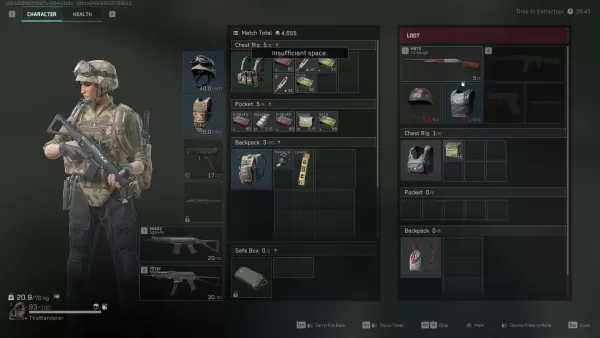
Success in Operations mode begins before you even enter the map—it starts with crafting the perfect loadout for the situation at hand. Every match requires an entry fee, so your loadout choices are critical. The essentials—helmet, armor, chest rig, and backpack—are mandatory for deployment. However, what you decide to bring beyond these basics will shape your gameplay strategy.
Extraction zones are typically fixed, but some maps feature dynamic elements like elevators or enemy-controlled checkpoints. Always have an exit strategy in mind before you venture deep into looting territory.
Loot Smarter, Not Harder
Every item in Operations mode has a sell value, but not all are worth the risk. Initially, focus on acquiring healing items, weapon attachments, and rare electronics—these are compact, valuable, and can be safely stored in your Safe Box if necessary.
While heavy weapons and armor may be tempting, they can slow you down and occupy valuable space. Only carry them if you're certain of extracting or if you're close to an exit with nothing to lose.
A useful tip for beginners is to steer clear of major loot spots during the early stages of the match. Allow other teams to engage in combat, then swoop in to collect the spoils. If playing solo, focus on looting the outskirts of the map and revisit later. You'll be amazed at the quality of items left behind after a chaotic team battle.
Picking the Right Operative
Your choice of Operative significantly influences your playstyle in Operations mode. Not all Operatives are suited for stealth or loot-focused gameplay, so select one that aligns with your objectives.
Luna and Hackclaw excel in providing intel and mobility. Luna can tag enemies and disrupt advances with her shock arrows, while Hackclaw moves silently and can execute silent takedowns with her knife. Stinger's healing abilities make him ideal for team runs, particularly when supporting more aggressive players.
Avoid Operatives with loud or conspicuous abilities unless your strategy involves direct confrontation. Characters like D-Wolf are entertaining but tend to draw unwanted attention in a mode where staying hidden often yields better outcomes.
Fight When It Matters
In Operations mode, choosing your battles wisely is more crucial than winning them. While PvP kills can yield gear and XP, they also consume time and attract attention. Engage only when necessary or when it's your best option.
If you find yourself in a firefight, keep moving and aim to end it swiftly. Utilize your abilities to gain an edge—Luna's detection arrow can reveal players behind cover, and Stinger's smoke can provide cover for healing or escaping.
Remember, you can always loot the fallen later. If two teams are clashing, hang back and let them weaken each other. Third-partying is risky but can be one of the most effective ways to acquire gear without having to outgun everyone yourself.
Making the Most of Each Match
Every raid offers an opportunity to accumulate value, hone your skills, or gain new insights. Don't dwell on a bad run—use it to refine your strategy for the next one.
Conserve your credits during losing streaks and play more strategically when you're on a winning streak. Upgrade your Safe Box as soon as possible, experiment with different Operative setups, and explore the maps to discover the most lucrative loot routes.
Over time, your focus will shift from mere survival to optimization. That's when Operations mode truly becomes enjoyable.
Delta Force's Operations mode is more than just a loot-and-run scenario. It's a game of risk, meticulous planning, and intelligent decision-making. Construct your loadout with purpose, loot judiciously, and know when to engage or retreat. And remember, every loss is merely a part of the journey that makes your first significant victory all the more rewarding.
For the optimal gaming experience, consider playing Delta Force on a PC using BlueStacks. You'll benefit from faster load times, precise controls, and easier gear management. It's the best way to stay competitive while mastering the game's intricacies.
Latest Articles
Mutants: Genesis Hits iOS, Android, Steam After Early Access
Clash Royale players finally get to witness the highly anticipated evolution of the Inferno Dragon. After nearly a decade without an upgrade, this fiery Legendary card receives a powerful transformation. The developers at Supercell teamed up with Fin
Pokemon GO Road Trip 2025 Details, Summer Pikachu Available
Experience Pokémon GO Road Trip Truck stops in the gameFind Wooloo, Phanpy, and Alolan Geodude in the wildSummer-style Pikachu makes a special appearanceIf today's new details don't get you excited for the Pokemon GO Road Trip 2025, nothing will. Thi

PlayStation Stars Shuts Down After 3 Years
Sony has announced the discontinuation of its PlayStation Stars loyalty program less than three years after its introduction.The rewards initiative stopped accepting new members today, with exiting participants unable to rejoin. Canceling membership
Mastering Cooking in Ragnarok X: Next Generation
Cooking in Ragnarok X: Next Generation is a dynamic system that enhances combat, resource gathering, and character progression. Preparing dishes grants temporary boosts, improving dungeon survivabilit

Poppy Playtime Chapter 4 Launches with Introductory Sale
Uncover new characters and a deeper backstoryNavigate the depths of the Playtime Co. factoryLimited-time introductory discount availableMob Entertainment has officially released Poppy Playtime Chapter 4, allowing you to dive into the next chilling ch
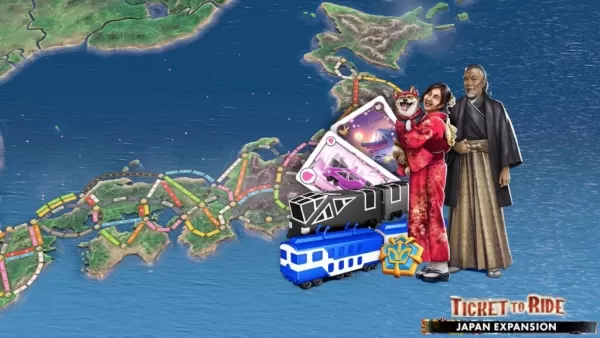
Japan Expansion for Ticket to Ride: Build the Bullet Train Network!
Ticket to Ride now lets you embark on a virtual train journey across Japan with its latest expansion. Marmalade Game Studio and Asmodee Entertainment have launched the Japan Expansion for their digital adaptation of the classic board game.
Help Build
Latest Games

Savanna Race
Racing丨24.8 MB

Bridge Car Race
Racing丨36.0 MB

Top Jockey
Racing丨251.6 MB
Hill Climb Racing
Racing丨116.2 MB
Zombie Derby 2
Racing丨66.3 MB

Sunset Bike Racer - Motocross
Racing丨47.9 MB

Racing Rivals
Racing丨217.5 MB










Top News
MORE +


01
01-06
CDPR acknowledged weak gameplay in The Witcher 3
The Witcher 3, while critically acclaimed, wasn't without its flaws. Many fans felt the combat system fell short.
In a recent interview, Witcher 4's game director, Sebastian Kalemba, acknowledged weaknesses in the previous game's gameplay, specifically highlighting the need for significant improvem
02
01-07
BREAKING: Flight Simulator 2024 Login Woes Ground Players
Flight Simulator 2024 Launch Plagued by Technical Difficulties
The highly anticipated launch of Flight Simulator 2024 has been significantly hampered by widespread technical problems, leaving many players grounded before they could even take to the virtual skies. This article details the reported d
03
11-17
Hogwarts Legacy 2 is "One of the Biggest Priorities" for WB Games
Following the successful launch of Quidditch Champions this week, Warner Bros. Discovery has confirmed its plans for a sequel to last year's Harry Potter-based action RPG hit Hogwarts Legacy—2023's best-selling game.Hogwarts Legacy Sequel Plans Confirmed by Warner Bros. DiscoveryExpected in
04
11-16
Airplane Chefs Brings The Ultimate Snack, Pringles, On Board!
Buckle up for some snacks as Nordcurrent has just dropped an exciting event for their cooking game. It’s the most unexpected collab of Airplane Chefs and Pringles. If you’ve been enjoying your virtual life as a flight attendant, things are about to get a lot tastier.The game developer behind p
05
11-16
Play Together to collaborate with Sanrio and introduce new My Melody and Kuromi content
Play Together is bringing back its Sanrio collab with the appearance of My Melody and KuromiYou can collect coins by completing their themed missions that can then be used to draw exclusive itemsAs a bonus there's also new summer-themed content and events, including a major bug huntPlay Together, th
Topics
More +

