
Application Description
Moon+ Reader is a powerful and versatile ebook reader offering extensive controls and full functionality for your entire digital library. It combines comprehensive document management with a beautifully designed reading experience, all in one application.
Embrace the Future of Digital Reading
As technology rapidly advances, more readers are switching from paper books to ebooks. Digital books provide unmatched portability, letting you carry a vast library without the bulk. Among the many reading apps available, Moon+ Reader is the top choice for Android. If
Read with Ease and Comfort
Moon+ Reader is the leading e-reader app, packed with unique features to deliver an exceptional reading experience. It allows you to read text files with incredible ease and convenience. Beyond that, its built-in tools let you customize and interact with PDF documents. The app's immersive feel makes it seem like you're reading a physical book. You can quickly archive titles, highlight passages, add bookmarks, and perform many other actions effortlessly.
This application supports reading all major book archive formats, including PDF, DOCX, ZIP, and more. Reading on a smart device can sometimes strain your eyes, but with Moon+ Reader, you need not worry. You can adjust the screen brightness instantly by simply swiping along the left edge of the display.
Powerful Text Editing and Customization
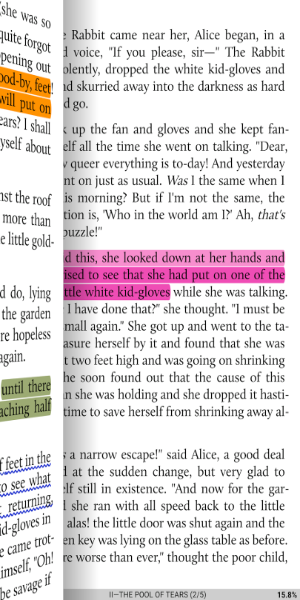
Moon+ Reader provides up to 24 customizable actions to tailor your reading. You can zoom, annotate, underline, or highlight key information. This app offers the tactile feel of editing a real paper book. Adjust fonts and text sizes to your preference, making it a truly flexible reading and editing tool.
Furthermore, Moon+ Reader includes a built-in dictionary and translation feature, making it easy to look up words—even specialized terminology. It supports over 40 global languages, expanding its usefulness for readers everywhere.
Simple and Intuitive to Use
Getting started with Moon+ Reader is straightforward. After a little practice, you’ll master all its features. From the main screen, open the menu to access various options. Choose "Net Library" to explore an unlimited online collection, or select "My Shelf" or "My File" to read books stored directly on your device.
Customize Every Detail
Moon+ Reader is designed around your preferences. It offers extensive customization to match your reading style. Choose from five automatic scrolling modes for page-turning, build a list of favorite authors and titles, and adjust screen lighting with a 95% eye protection filter to ensure comfortable reading for extended periods.
With its powerful features, user-friendly design, and deep customization, Moon+ Reader provides an unparalleled ebook reading experience.

Key Features
- Supports EPUB, PDF, DJVU, AZW3, MOBI, FB2, PRC, CHM, CBZ, CBR, UMD, DOCX, ODT, RTF, TXT, HTML, MHT/MHTML, MD (MarkDown), WEBP, RAR, ZIP, and OPDS.
- Complete visual controls: line spacing, font scaling, bold, italic, shadow, justified alignment, alpha colors, fading edges, and more.
- Over 10 built-in themes, including a Day & Night mode switcher.
- Multiple paging methods: touch screen, volume keys, camera button, search, or back keys.
- 24 customizable actions (screen taps, swipe gestures, hardware keys) assignable to 15 events: search, bookmark, theme change, navigation, font size adjustment, etc.
- 5 auto-scroll modes: rolling blind; by pixel, by line, or by page. Includes real-time speed control.
- Adjust brightness by sliding along the left screen edge; full gesture command support.
- Intelligent paragraph handling; indent paragraphs; trim excess blank spaces.
- "Eye health" protection settings for extended reading sessions.
- Realistic page-turning effects with adjustable speed, color, and transparency; 5 page-flip animations.
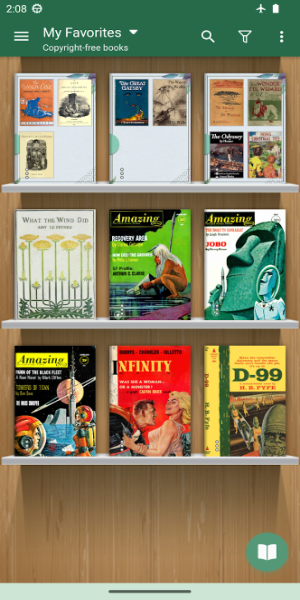
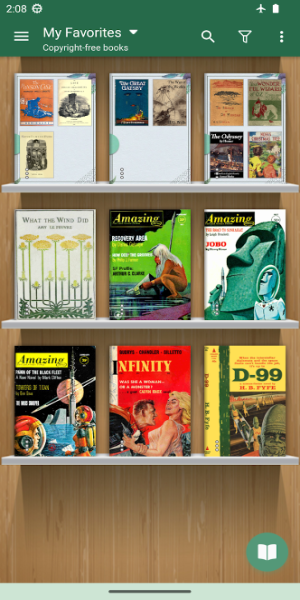
- Customizable Bookshelf: Favorites, Downloads, Authors, Tags; supports custom covers, search, and import.
- Justified text alignment and hyphenation mode.
- Dual-page mode for landscape orientation.
- Supports all four screen rotations.
- EPUB3 multimedia support (video and audio).
- Backup/Restore to cloud via Dropbox/WebDav; sync reading progress across phones and tablets.
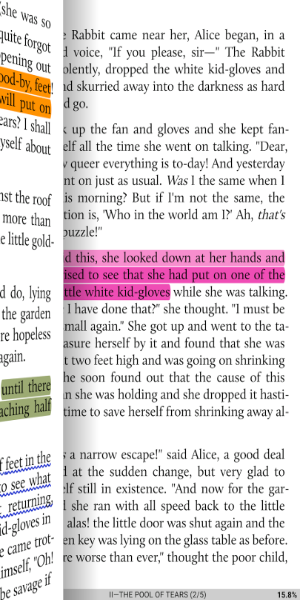
- Highlight, annotate, dictionary lookup, translation, and sharing—all integrated.
- Reading Ruler for focused reading (6 styles).
Screenshot

Reviews
Post Comments
Latest Articles
Creative Director Exits Haven Studios Amid Fairgames Departure
PlayStation's upcoming live-service game Fairgames faces renewed scrutiny after its creative director, Daniel Drapeau, confirmed he has left Haven Studios to join Warner Bros. Games Montreal.This marks the second high-profile departure this summer, f

Watcher of Realms kicks off the Christmas holidays with Frostfall Jamboree this week
Watcher of Realms is celebrating the holidays with the new Frostfall JamboreeGrab new event-exclusive items and join special activitiesMake sure to visit the event store and latest character promotionsWith Christmas approaching rapidly, some mobile g

Blood Message: Preorder for Exclusive DLC
Blood Message currently hasn't revealed any DLC plans. We'll promptly update this page when official announcements become available.
RE9: Resident Evil Requiem Release Date Revealed
Capcom officially unveiled Resident Evil Requiem (RE9) during the Summer Game Fest 2025. Continue reading to discover its scheduled release date, supported platforms, and full announcement timeline.Resident Evil Requiem (RE9) Release Date and TimeFeb

Control: Resonant Introduces Skill Trees and Exploration Mechanics in Latest Preview
Fresh previews for Control Resonant, the highly anticipated sequel to Remedy Entertainment’s Control, have unveiled deeper insights into its gameplay mechanics, exploration dynamics, and character progression within the expanding Remedy Connected Uni

DMZ Recon Mode Guide for Call of Duty Mobile
Call of Duty: Mobile keeps pushing boundaries beyond classic multiplayer and battle royale with DMZ: Recon, a fresh PvPvE mode drawing inspiration from Modern Warfare II's DMZ experience. Introduced in the Season 11: 6th Anniversary update, this mode
Apps like Moon+ Reader



مانجاي - Mangay
News & Magazines丨28.81M

MangaHub
News & Magazines丨15.23M

Zinmanga
News & Magazines丨53.46M


MangaGo
News & Magazines丨4.10M

BOMTOON
News & Magazines丨10.58M

ComicK
News & Magazines丨2.26M
Latest Apps









Trending Apps
MORE +









Top News
MORE +

01
01-16
Fidough Arrives in Pokémon Go as New Global Challenges Approach
Get ready for the Fidough Fetch event in Pokémon Go! From January 3rd to 7th, trainers can welcome the adorable Puppy Pokémon, Fidough, and its evolution, Dachsbun, to the game. This event features exciting Global Challenges, offering fantastic rewards for collaborative gameplay.
Team up with fello
02
01-07
BREAKING: Flight Simulator 2024 Login Woes Ground Players
Flight Simulator 2024 Launch Plagued by Technical Difficulties
The highly anticipated launch of Flight Simulator 2024 has been significantly hampered by widespread technical problems, leaving many players grounded before they could even take to the virtual skies. This article details the reported d
03
01-06
CDPR acknowledged weak gameplay in The Witcher 3
The Witcher 3, while critically acclaimed, wasn't without its flaws. Many fans felt the combat system fell short.
In a recent interview, Witcher 4's game director, Sebastian Kalemba, acknowledged weaknesses in the previous game's gameplay, specifically highlighting the need for significant improvem
04
11-17
Hogwarts Legacy 2 is "One of the Biggest Priorities" for WB Games
Following the successful launch of Quidditch Champions this week, Warner Bros. Discovery has confirmed its plans for a sequel to last year's Harry Potter-based action RPG hit Hogwarts Legacy—2023's best-selling game.Hogwarts Legacy Sequel Plans Confirmed by Warner Bros. DiscoveryExpected in
05
11-16
Airplane Chefs Brings The Ultimate Snack, Pringles, On Board!
Buckle up for some snacks as Nordcurrent has just dropped an exciting event for their cooking game. It’s the most unexpected collab of Airplane Chefs and Pringles. If you’ve been enjoying your virtual life as a flight attendant, things are about to get a lot tastier.The game developer behind p
Topics
More +